Voltage Drop Schedule

Creates a calculation schedule for the voltage drop on fire alarm circuits in the project.
You must be in a drafting view to use this command.
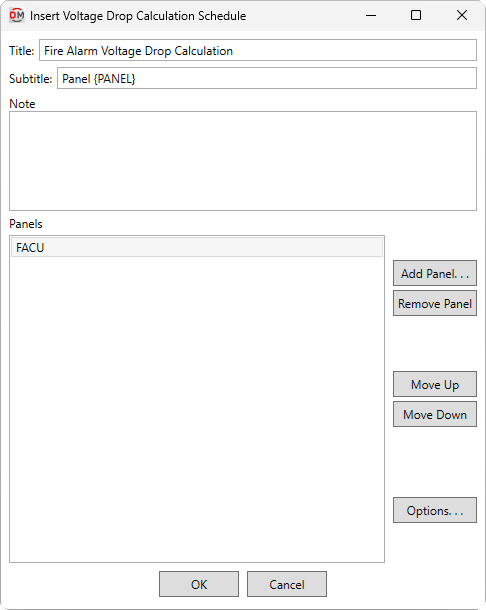
You will be prompted to select a fire alarm panel for which the schedule will be created. The Insert Voltage Drop Calculation Schedule dialog box will open:
Insert Voltage Drop Calculation Schedule Dialog Box
-
Title: The title to be used for the schedule. You can use the text
{PANEL}to automatically generate the name of the panel. -
Subtitle: A subtitle to be added below the title for the schedule. You can use the text
{PANEL}to automatically generate the name of the panel. -
Note: A note that will appear below the schedule when it is inserted on the drafting view.
-
Panels ☰ A list of the panels for which circuits will be displayed in the schedule.
-
Press this button to select additional panels to be displayed in the schedule.
-
Press this button to remove the selected row from the list of panels.
-
Press this button to move the selected row up in the list of panels.
-
Press this button to move the selected row down in the list of panels.
-
Press this button to open the Project Options dialog box with only the options in the Voltage Drop section visible.
Inserting the Voltage Drop Calculation Schedule on the Drafting View
To insert the voltage drop calculation schedule on the drafting view, press the button. The settings you specified in the dialog box will be used for the schedule you insert.
You will be prompted for the insertion location of the schedule.
Specify insertion point of voltage drop schedule:
The location you specify will be used as the top-left corner for the schedule.
System voltage: The displayed voltage of the fire alarm system.
There are several other options that affect the default settings and overall appearance of the voltage drop schedule, as well as how voltage drop is calculated. Visit the Voltage Drop Project Options section for more information.