Riser Diagram Device Graphics

Allows you to customize the list of graphic families available to be used for devices on the riser diagram.
Opens the Riser Diagram Device Graphics dialog box:
Riser Diagram Device Graphics Dialog Box
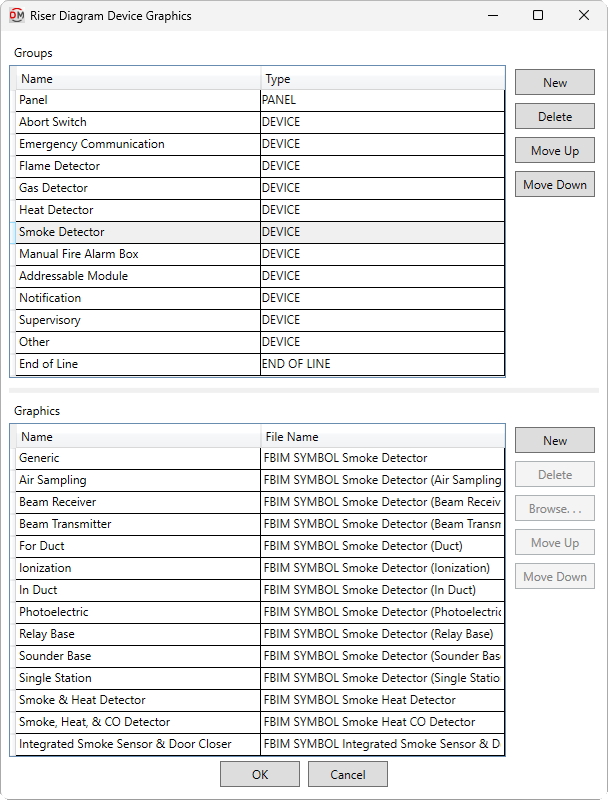
Groups
This section sets how graphic families are grouped and displayed in commands and fields that allow you to set riser diagram graphics for devices.
-
Name The name that is displayed when selecting a Riser Group ▾ or graphic Device Type ▾ in commands.
-
Type ▾ The device type with which the group will be associated when populating device graphics fields and lists, based upon the Revit Family Category ☰ and Part Type ▾ of the device family.
-
PANEL The group will be displayed when specifying graphics for Electrical Equipment that have their Part Type ▾ set to Other Panel.
-
DEVICE The group will be displayed when specifying graphics for Fire Alarm Devices.
-
-
Creates a new group.
-
Deletes the current group.
-
Moves the selected group up in the list.
-
Moves the selected group down in the list.
Graphics
This section sets which graphic families are available to be selected in the active group.
-
Name The name of the graphic family that is displayed in fields and lists.
-
File Name The file name of the graphic family displayed on the riser diagram, not including the file extension.
-
Creates a new row. The new row will use the same settings as the selected row when the button was pressed.
-
Deletes the current row.
-
Press this button to select a file for the current graphic.
-
Moves the selected graphic up in the list.
-
Moves the selected graphic down in the list.