Circuit Insert

Allows you to insert circuits on the riser diagram.
You will be prompted to specify the panel from which the circuit will be drawn.
Select panel to insert circuit from:
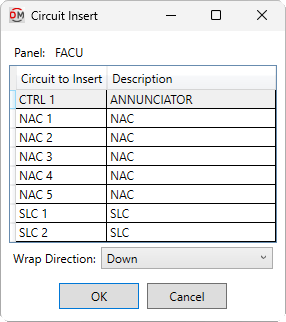
Opens the Circuit Insert dialog box:
Circuit Insert Dialog Box
-
Panel: The selected panel. The circuits listed are associated with the panel.
-
Wrap Direction: ▾ Whether the circuit wraps up or down if it extends past the specified wrap point on the drafting view.
You can select multiple circuits in the list using the SHIFT or CTRL key. Circuits will be inserted in the order selected. Select one or more circuits from the list and press the button. The prompts you receive depend upon whether circuits have already been inserted for the selected panel.
Panel Does Not Have Inserted Circuits
You will be prompted to specify the starting point of the circuit.
Specify insertion point:
You will then be prompted to specify the wrap point, which will also determine the direction of the circuit.
Specify wrap point and circuit direction relative to insertion point:
The first device on the circuit will be inserted at the first specified point. Additional devices will be inserted in the direction of the specified wrap point, wrapping up or down when extending past that point based upon the Wrap Direction ▾. If you selected multiple circuits, the remaining circuits will be inserted automatically, offset above or below based upon their position relative to the panel, and extending in the same direction as the first circuit.
Panel Has Inserted Circuits
You will be prompted to specify the starting point of the circuit.
Specify insertion point or press ESC to auto-insert:
-
Specify insertion pointSpecify a point on the drafting view. If circuits have been inserted on the same side of the panel as the specified point, the new circuit will automatically be oriented to the previous circuits. Otherwise, the command will continue the same way as in the Panel Does Not Have Inserted Circuits section. -
Press ESCPress ESC to insert the circuit automatically based upon the location and direction of inserted circuits for the panel.
Wire offset multiplier / Vertical circuit spacing: When inserting multiple circuits, sets the vertical distance between each circuit.
Horizontal device spacing: Sets the horizontal distance between devices on a circuit.