Modify Graphic

Allows you to modify the graphic for a panel or device already inserted on the riser diagram.
You will be prompted to specify a panel or device.
Select riser diagram item to change graphic of:
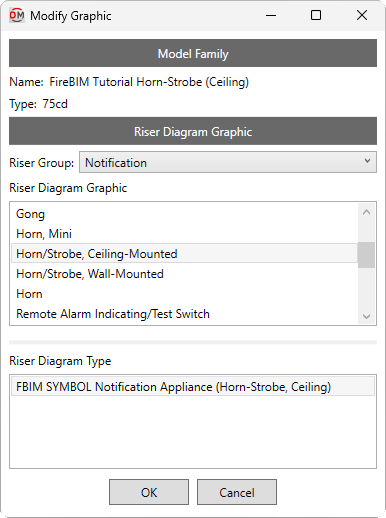
The Modify Graphic dialog box will open:
Modify Graphic Dialog Box
Model Family
This section displays the family and type of the selected panel or device. This information can be used to determine the appropriate graphic.
Riser Diagram Graphic
-
Riser Group: ▾ The graphic category used for the panel or device. The groups available are based upon settings in the Riser Diagram Device Graphics command.
-
Riser Diagram Graphic ☰ The riser diagram graphic family used for the panel or device. The values in this list are based upon the Riser Diagram Device Graphics command and the selected Riser Group ▾.
-
Riser Diagram Type ☰ The riser diagram graphic type used for the selected Riser Graphic ▾.
Press the button to change the panel or device graphic on the riser diagram.
You will be asked whether to update the labels for the panel or device:

-
Update labels The labels will update to the default location and tags for the graphic.
-
Leave labels as they are The location and tags will not be updated. The information for the existing tags will be updated.