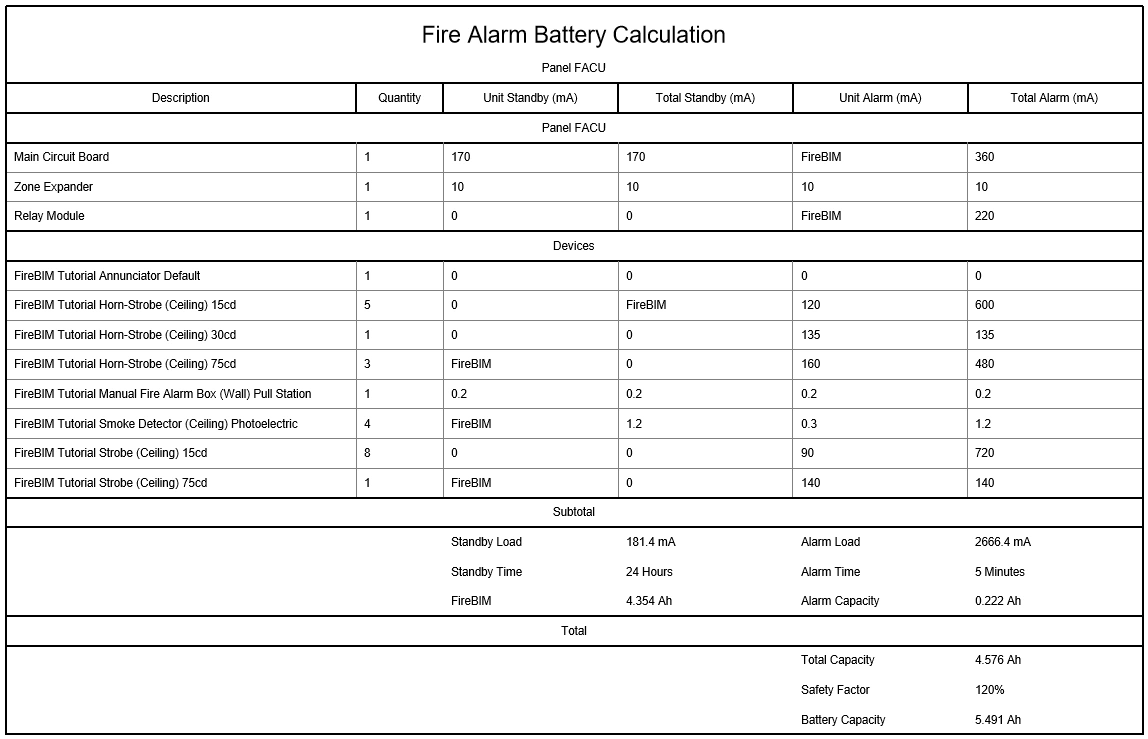
Customizing Battery Calculations
Modify project-level settings to customize battery calculations.
Start in the CALCULATION SCHEDULES drafting view.
Modify Project Settings & Update the Schedule
-
Run the
FireBIM Design→ command. The Options dialog box will open. Customization→ Project Options
 -
In the Battery Calculations section, make the following changes:
- Set Alarm time to 5.
- Set Safety factor to 1.2.
- Set Load units ▾ to Milliamps.
warningWhen calculating battery capacity for your projects, consult the code reference for your jurisdiction to determine the appropriate safety factor.
-
Press the button to close the dialog box.
-
Run the
FireBIM Design→ command. Schedule Update
 -
Select the battery calculation schedule on the drafting view. The schedule will update to reflect the changes.