Customizing Voltage Drop Calculations
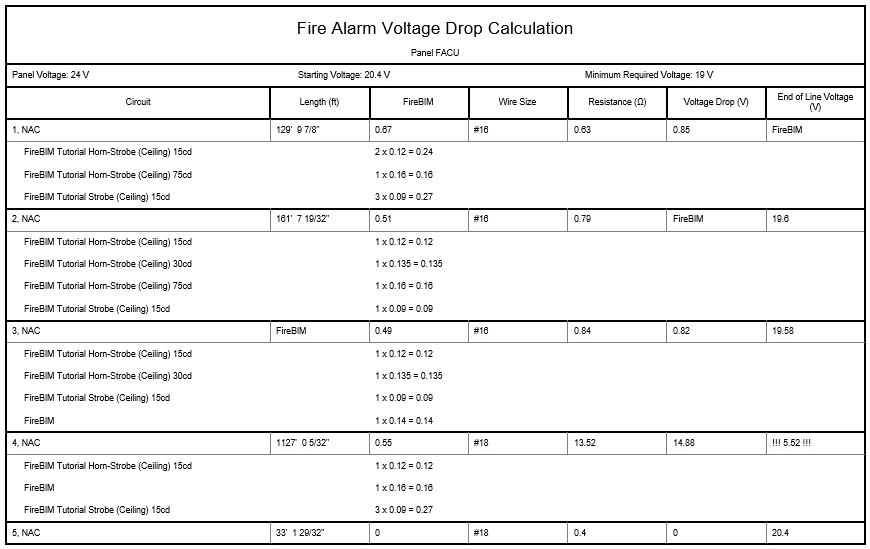
Modify project-level settings to customize voltage drop calculations.
Start in the CALCULATION SCHEDULES drafting view.
Modify Project Settings
-
Run the
FireBIM Design→ command. The Options dialog box will open. Customization→ Project Options
 -
In the Voltage Drop section, make the following changes:
- Set Minimum circuit voltage to 19.
- Set Calculation method to End-of-line.
-
Press the button to close the dialog box.
-
Run the
FireBIM Design→ command. Schedule Update
 -
Select the voltage drop calculation schedule on the drafting view. The schedule will update to reflect the changes.
Modify Cable Properties
-
Run the
FireBIM Design→ command. The Cable Types dialog box will open. Customization→ Cable Types -
Select the Copper, Uncoated group from the list.
-
For the #18 cable row, set Resistance to 12.
-
Press the button to close the dialog box.
-
Run the
FireBIM Design→ command. Schedule Update -
Select the voltage drop calculation schedule on the drafting view. The schedule will update to reflect the changes.