Configure AI Agent
Configures AI agents to work with AquaBIM via MCP.
You must have a subscription to Claude Desktop, Claude Code, or Codex to use this feature.
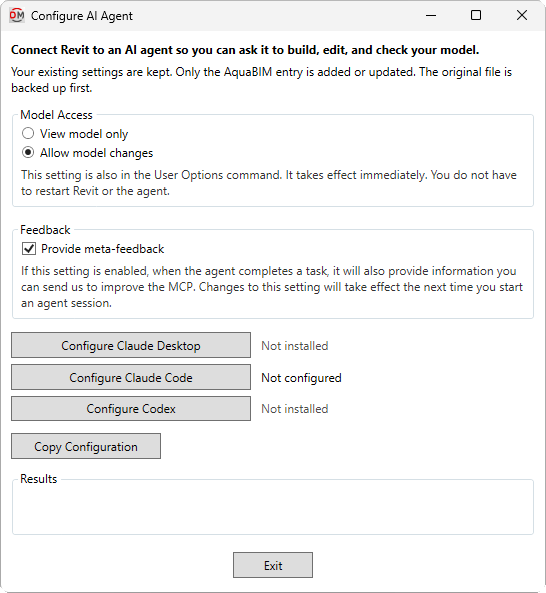
Opens the Configure AI Agent dialog box:
Configure AI Agent Dialog Box
-
🔘 Model Access Whether AI agents connected to AquaBIM via MCP can make changes to the model as well as read information from it.
- View model only Agents can read information from the model, but not make changes.
- Allow model changes Agents can read information from and write changes to the model.
-
☐ Provide meta-feedback Whether AI agents provide feedback about the MCP itself after completing tasks.
-
Configures the specified AI agent to connect to the MCP. Status messages are provided beside the button for each agent.
- Not installed The agent is not installed on your machine. You can press the button to configure the MCP connection.
- Not configured The agent is installed on your machine but has not been configured to connect to the MCP.
- Configured The agent has successfully been configured to connect to the MCP.
-
Copies JSON code to your clipboard that you can use to connect an AI agent to the MCP manually.
-
Results After a button is pressed, displays a message indicating whether the action was successful.
Once the AI agent has been configured, start a new agent session to use the MCP. For example prompts and more information about what your agent can do with AquaBIM, visit the What Can AquaBIM Do? article in the knowledge base.