Design Master Electrical Entities Insert Skewed or in the Wrong Location
When I insert one-line diagram graphics, devices, schedules, or any other Design Master Electrical entities on the drawing, they come in skewed, in a different location than the one I specified, or don't seem to insert at all. What's happening, and how do I fix it?
Cause
Your drawing view has become skewed. As a result, the point you think you're selecting in three-dimensional space will not be the point where Design Master Electrical tries to insert those entities.
For entities like a receptacle graphic or a schedule, this will cause them to insert somewhere else on the drawing.
For complex entities like one-line diagram graphics, this can also cause them to appear skewed, especially when inserting several graphics at once using one of the
Solution
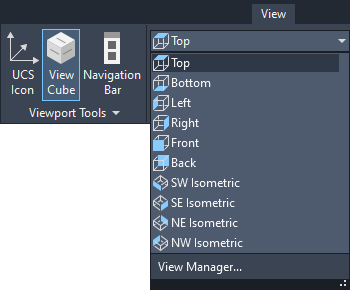
The solution is to reset your view to "Top" using AutoCAD's view cube or commands on the View ribbon, shown below. The entities should then insert normally.