Edit Equipment List
To edit the equipment list project settings, go to
Ribbon:  Equipment List Label Group
Pulldown Menu:
To edit the equipment list standards settings, go to
Ribbon:  Equipment List Label Group
Pulldown Menu:
Select Equipment Group Dialog Box

Select the equipment group to be edited and press the button.
Equipment Schedule Label Display and Order Dialog Box
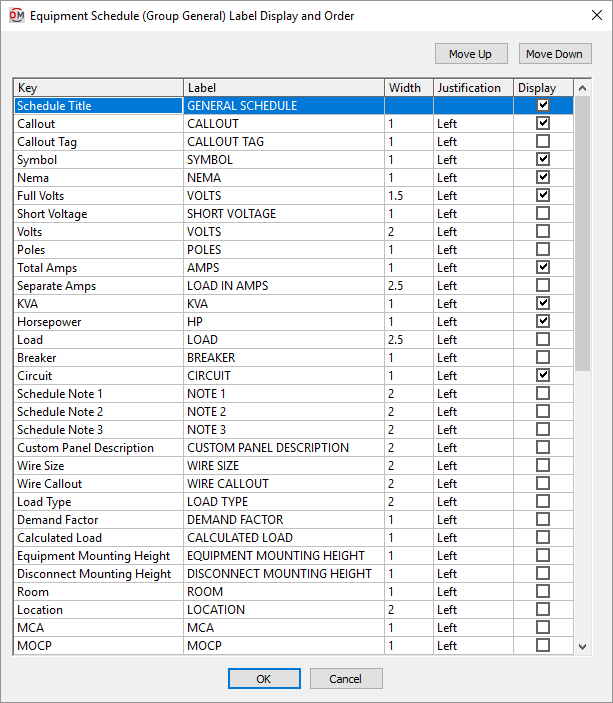
Visit the Common Label and Schedule Information section for more information about using the and buttons and the Key ☰, Label, Width, Justification ▾, and ☐ Display fields.
Values in the Key ☰ column are listed alphabetically below.
-
Breaker The size of the breaker and number of poles for the piece of equipment.
Examples: 20/1, 30/3
-
Calculated Load The total calculated load in kVA.
If the equipment has a Kitchen, Appliance, Continuous, Appliance, Noncontinuous, Electric Dryer, Electric Cooking, or Dwelling Unit Heating load, the appropriate NEC reference for the calculated load will be displayed instead. Visit the Load Information section for more information.
-
Callout The name of the piece of equipment as specified in the equipment definition.
-
Callout Tag The callout tag block for the equipment. Visit the Equipment Options section for more information.
-
Circuit The circuit to which the equipment is connected.
-
Control Wiring By This value is taken from the equipment definition.
-
Custom Panel Description The panel description for the equipment. The default value is the callout.
-
Demand Factor The demand factor for each of the loads.
-
Description This value is taken from the equipment definition.
-
Disconnect This value is taken from the equipment definition.
-
Disconnect Description This value is taken from the equipment definition.
-
Disconnect Fuse Size This value is taken from the equipment definition.
-
Disconnect Fuse Type This value is taken from the equipment definition.
-
Disconnect Installed By This value is taken from the equipment definition.
-
Disconnect Mounting Height The elevation at which the disconnect is mounted.
-
Disconnect Provided By This value is taken from the equipment definition.
-
Disconnect Schedule Note 1 This value is taken from the equipment definition.
-
Disconnect Schedule Note 2 This value is taken from the equipment definition.
-
Disconnect Schedule Note 3 This value is taken from the equipment definition.
-
Equipment Mounting Height The elevation at which the equipment is mounted.
-
FLA / BCSC This value is taken from the equipment definition.
-
Frame Size This value is taken from the equipment definition.
-
Full Volts The full voltage designation for the equipment. It includes the voltage, the number of poles, and the number of wires.
Examples: 120V 1P 2W, 208V 2P 2W
-
Horsepower If the piece of equipment has a motor specified in horsepower, the size will be displayed. If it does not have a motor specified in horsepower, this field will be left blank.
-
Installed By This value is taken from the equipment definition.
-
KVA The total connected load in kVA.
-
Load All of the loads on the equipment. The load type and load size in kVA or horsepower are listed.
-
Load Type All of the load types on the equipment.
-
Location This value is taken from the equipment definition.
-
MCA This value is taken from the equipment definition.
-
MOCP This value is taken from the equipment definition.
-
NEMA This value is taken from the equipment definition.
-
Poles The number of poles on the equipment.
-
Provided By This value is taken from the equipment definition.
-
Room The room the equipment is inserted in.
-
Schedule Note 1 This value is taken from the equipment definition.
-
Schedule Note 2 This value is taken from the equipment definition.
-
Schedule Note 3 This value is taken from the equipment definition.
-
Separate Amps The connected amps for each of the different load types for a piece of equipment. Each load is listed separately.
-
Sheet This value is taken from the equipment definition.
-
Short Voltage The voltage designation for the equipment without the wires listed. It includes the voltage and the number of poles.
Examples: 120V 1P, 208V 2P
-
Starter Description This value is taken from the equipment definition.
-
Starter Installed By This value is taken from the equipment definition.
-
Starter NEMA Enclosure This value is taken from the equipment definition.
-
Starter NEMA Size This value is taken from the equipment definition.
-
Starter Provided By This value is taken from the equipment definition.
-
Starter Schedule Note 1 This value is taken from the equipment definition.
-
Starter Schedule Note 2 This value is taken from the equipment definition.
-
Starter Schedule Note 3 This value is taken from the equipment definition.
-
Starter Thermal Overload This value is taken from the equipment definition.
-
Symbol The blocks used to represent the piece of equipment, including the disconnect if the equipment has one.
-
Total Amps The total calculated load in amps.
-
Trip Size The size of the breaker for the circuit to which the equipment is connected.
-
Volts The voltage only for the equipment. It does not include the number of poles or wires.
Examples: 120, 208
-
Volts and Phase The voltage designation for the equipment with the phase listed instead of the number of poles.
Examples: 120V 1-PH 2W, 208V 3-PH 4W
-
Volts Only The voltage value of the equipment. Only the volts will be displayed. The poles and wires will not be displayed.
Examples: 120V, 208V
-
Wire Callout The full wire callout for the equipment.
-
Wire Length The length of the phase wire connected to the equipment.
-
Wire Size The size of the phase wire connected to the equipment.