Edit Feeder Schedule List
To edit feeder schedule project settings, go to
Ribbon:  Feeder Schedule Label Group
Pulldown Menu:
To edit feeder schedule standards settings, go to
Ribbon:  Feeder Schedule Label Group
Pulldown Menu:
Feeder Schedule Label Display and Order Dialog Box
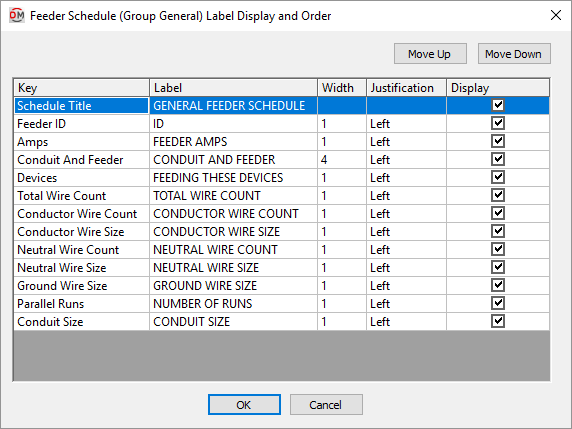
Visit the Common Label and Schedule Information section for more information about using the and buttons and the Key ☰, Label, Width, Justification ▾, and ☐ Display fields.
Values in the Key ☰ column are listed alphabetically below.
-
Amps The ampacity of the feeder.
-
Conductor Wire Count The number of conductor wires for the feeder.
-
Conductor Wire Size The conductor wire size for the feeder.
-
Conduit and Feeder The size of the feeder, including the conduit size and all wire sizes.
-
Conduit Size The conduit size for the feeder.
-
Devices The distribution equipment fed by this size feeder.
-
Feeder ID The feeder ID for this size feeder.
-
Ground Wire Size The ground wire size for the feeder.
-
Neutral Wire Count The number of neutral wires for the feeder.
-
Neutral Wire Size The neutral wire size for the feeder.
-
Parallel Runs The number of parallel runs for the feeder.
-
Total Wire Count The total number of conductor and neutral wires for the feeder.