Edit Receptacle Schedule List
To edit receptacle schedule project settings, go to
Ribbon:  Receptacles Schedule Label Group
Pulldown Menu:
To edit receptacle schedule standards settings, go to
Ribbon:  Receptacles Schedule Label Group
Pulldown Menu:
Receptacle Schedule Label Display and Order Dialog Box
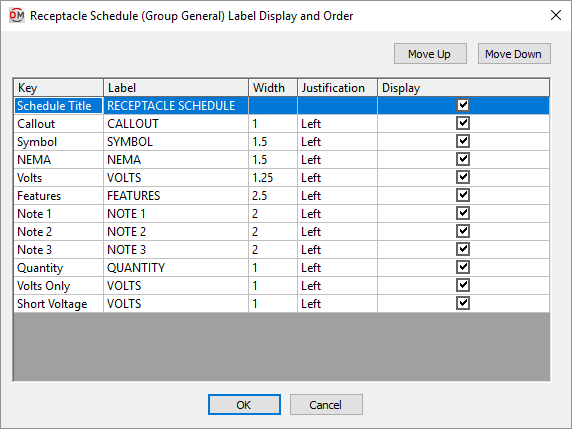
Visit the Common Label and Schedule Information section for more information about using the and buttons and the Key ☰, Label, Width, Justification ▾, and ☐ Display fields.
Values in the Key ☰ column are listed alphabetically below.
-
Callout The callout of the receptacle as defined in the receptacle project schedule.
-
Features A list of the different features of the receptacle (e.g., whether the receptacle is explosion proof or waterproof, and if the GFCI has a ground or an isolated ground).
-
NEMA The NEMA rating value taken from the schedule.
-
Note 1 Note taken from the schedule.
-
Note 2 Note taken from the schedule.
-
Note 3 Note taken from the schedule.
-
Quantity The number of receptacles inserted in the project. If a receptacle type is not inserted, NOT USED will be displayed.
-
Short Voltage The voltage value and poles of the receptacle.
Examples: 120V 1P, 208V 2P
-
Symbol The block used to represent the receptacle. The subscript for the receptacle can be displayed in this column. Visit the Insert Receptacle Project Schedule section for more information.
-
Volts The full voltage value of the receptacle. The volts, poles, and wires will be displayed.
Examples: 120V 1P 2W, 208V 2P 2W
-
Volts Only The voltage value of the receptacle. Only the volts will be displayed. The poles and wires will not be displayed.
Examples: 120V, 208V