Enclosed Breakers / Disconnects
To create or modify an enclosed breaker or disconnect, go to
Ribbon:  Enclosed Breakers / Disconnects
Pulldown Menu:
Enclosed Breaker / Disconnect Dialog Box
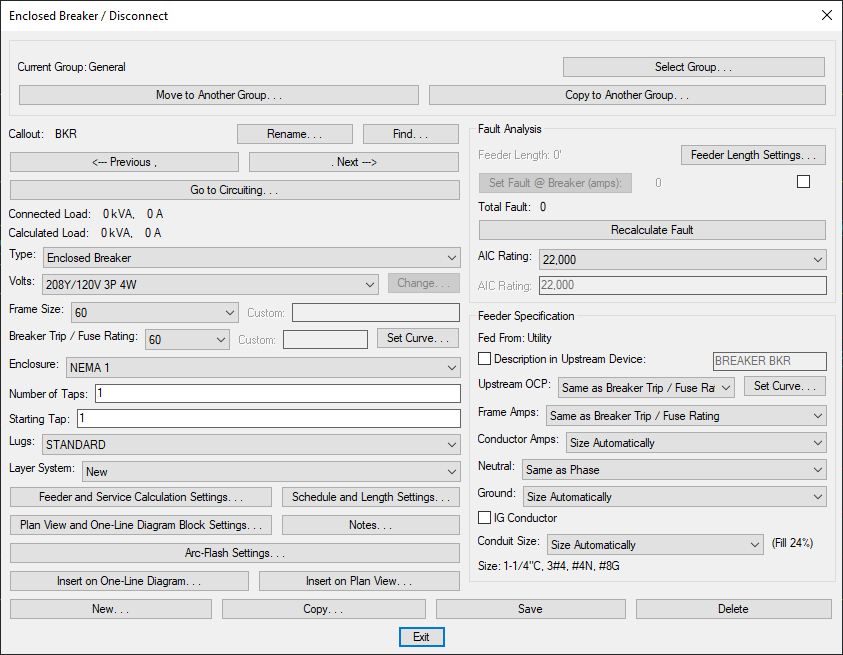
Visit the Common Schedule Dialog Box Features section for more information about how this dialog box works. This section describes the , , , , , , , and buttons.
-
Type: ▾ The type of breaker or disconnect.
-
Frame Size: ▾ The physical size of the breaker or disconnect.
-
Breaker Trip/Fuse Rating: ▾ The overcurrent protection size of the breaker or disconnect.
-
Press this button to configure the curve for the disconnect. The Select Curve dialog box will open.
-
Enclosure: ▾ The NEMA rating for the breaker or disconnect enclosure.
Visit the Distribution Equipment Dialog Box Settings section for more information about the other values and buttons in this dialog box.