Print Equipment in Database Only Takeoff
To perform a takeoff of the equipment that is in the project database but not on a drawing, go to
Ribbon:  Print Equipment in Database Only Takeoff
Pulldown Menu:
Print Equipment in Database Only Takeoff Dialog Box

Visit the Common Takeoff Information section for more information about how this dialog box works.
Printing an Equipment in Database Only Takeoff
Press the button. The takeoff will be generated as an HTML file and displayed in your web browser.
This takeoff will only list equipment that is stored in the database but has not been inserted on a drawing. An example takeoff is shown below.
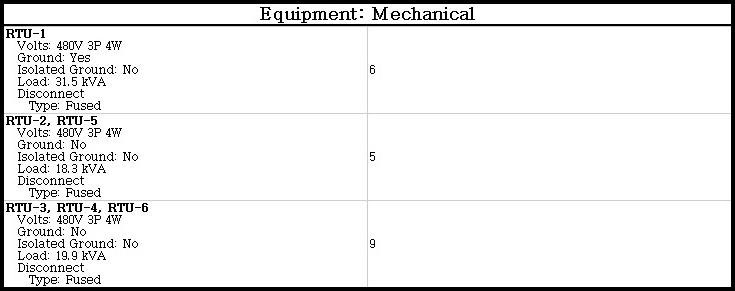
Each distinct equipment connection is listed in a separate row. The description of the equipment connection is listed on the left. The number of equipment connections matching that description is listed on the right.