Design Review

Sends your electrical model to an AI, which will output a design review of your distribution equipment and feeders as an HTML file that opens in your browser.
Depending on your company's data security policies, this command may not be available. Visit Restricting the Design Review Command for more information.
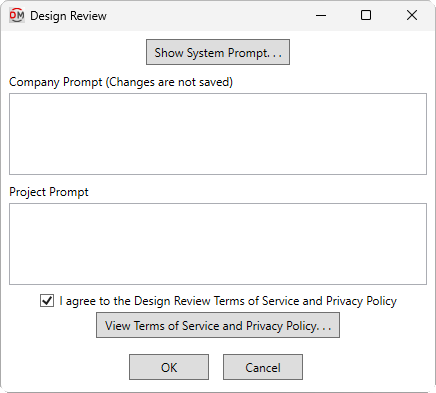
Opens the Design Review dialog box:
Design Review Dialog Box
-
Opens the System Prompt dialog box, which displays the context provided to the AI for the design review. This prompt is defined by Design Master and cannot be changed in this command.
-
Company Prompt Additional company-specific prompting for the AI. For more information about uses for this prompt, visit the Company Prompt page.
noteChanges made to the company prompt in this dialog box will not be saved. To create or modify the default company prompt that appears in this dialog box, use the Company Prompt command.
-
Project Prompt Additional project-specific prompting for the AI. For more information about uses for this prompt, visit the Project Prompt page.
noteChanges made to the project prompt will be saved upon pressing the button. To modify the project prompt without generating a design review, use the Project Prompt command.
-
☐ I agree to the Design Review Terms of Service and Privacy Policy Whether you agree to the terms of use and privacy policy for the AI design review. This box must be checked to use the
Design Review command. -
Opens the Design Review Terms of Service and Privacy Policy in your browser.
Generating the Design Review
Press the button to send your electrical model information, along with the system, company, and project prompts, to an AI for review. A webpage will open in your default browser that will show the report being generated. You can continue working as the report generates. When the design review is complete, it will be saved as an HTML file in the same folder as your Revit project.
For specific findings in the design review, a button will be provided that, when pressed, will highlight the relevant distribution equipment on your single-line diagram or in the model.