Export Model as Text

Exports your electrical model data to a text file that can then be submitted to AI tools for design reviews or other purposes. This command is useful when working on projects for which the use of public AI tools is restricted by your company or client.
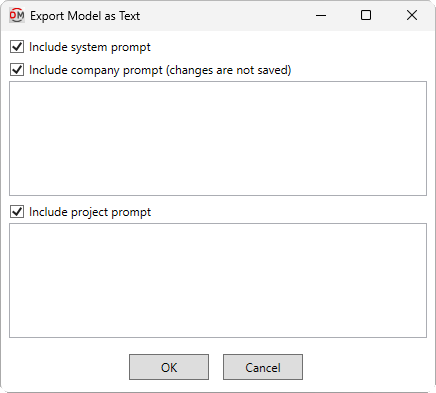
Opens the Export Model as Text dialog box:
Export Model as Text Dialog Box
-
☐ Include system prompt Whether a system prompt that provides context to the AI tool will be included in the export.
-
☐ Include company prompt Whether company-specific prompting will be included in the export. For more information about uses for this prompt, visit the Company Prompt page.
noteChanges made to the company prompt in this dialog box will not be saved. To create or modify the default company prompt that appears in this dialog box, use the Company Prompt command.
-
☐ Include project prompt Whether project-specific prompting will be included in the export. For more information about uses for this prompt, visit the Project Prompt page.
noteChanges made to the project prompt will be saved upon pressing the button. To modify the project prompt without generating a design review, use the Project Prompt command.
Press the button to set the save location and name of the text file. Upon saving, the file will be opened in your default text editor.