Arc-Flash Stickers

Allows you to create arc-flash stickers for distribution equipment.
The sticker will also display the shock protection information for the device. Shock protection is a function of the voltage of the distribution equipment. Shock protection values are based upon NFPA 70E-2018, Table 130.4(D)(a).
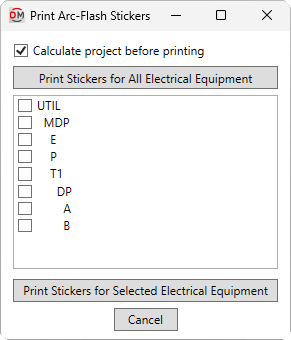
Opens the Print Arc-Flash Stickers dialog box:
Print Arc-Flash Stickers Dialog Box
-
☐ Calculate project before printing Whether the Calculate Whole Project command is run before printing the stickers.
-
Press this button to print stickers for all of the distribution equipment in the project.
-
Distribution Equipment Tree ☰ Every piece of distribution equipment in the current project that has Calculate Arc-Flash ▾ set to Yes in the Panel Edit command, listed in a tree corresponding to how the equipment are connected to each other. Distribution equipment with one or fewer circuits and no downstream distribution equipment are moved to the bottom of the list.
-
Press this button to print stickers for the selected distribution equipment in the Distribution Equipment List ☰.
Printing Arc-Flash Stickers
An HTML file will be created in the project folder with the arc-flash stickers for the specified distribution equipment, as well as a CSS file that controls how the stickers are formatted. An example arc-flash sticker is shown below.
The format of and information displayed on the arc-flash stickers is based upon ANSI Z535.4 and NFPA 70E 130.5(H). For more information, watch our video about arc-flash labels.
