Fault

Creates a fault schedule named based upon the Fault current schedule name in the Project Options command and sets it to the active view. If a schedule of the same name already exists, this command sets that schedule to the active view but does not otherwise modify it.
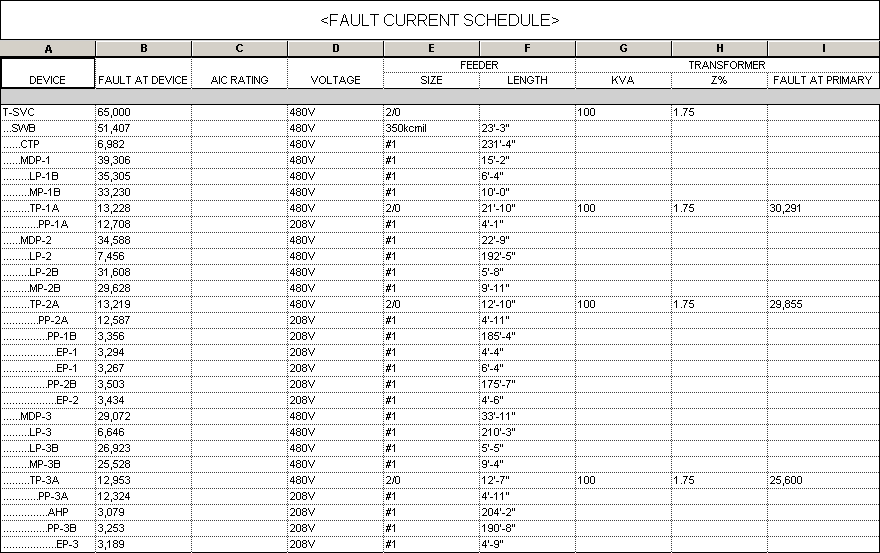
The default schedule layout is shown below. Information about the fault at each piece of distribution equipment in the project is listed. The devices are ordered based upon the connections between devices in the model.
Once the schedule is created, you can modify it using standard Revit tools.
The FAULT AT DEVICE column uses the DMET_Fault_FaultAtDevice shared parameter by default. This parameter displays a warning in the value for any fault values that exceed that AIC Rating of the distribution equipment. To display the fault without any warnings, replace the column with the DMET_Fault_FaultAtDevice_NoWarnings shared parameter.
Fault current schedule name: Sets the name of the schedule.
Output shared parameter values as uppercase: Sets whether shared parameter outputs are displayed only in uppercase letters.
Text before / after parallel runs: Sets the text added before and after the number of parallel runs displayed in the Feeder Size column.
Feeder wire make-up length: Sets additional length to be added to feeders for connections, which can impact fault calculations.