Voltage Drop Review

Creates a voltage drop upsize review schedule named based upon the Voltage drop review schedule name in the Project Options command and sets it to the active view. If a schedule of the same name already exists, this command sets that schedule to the active view but does not otherwise modify it.
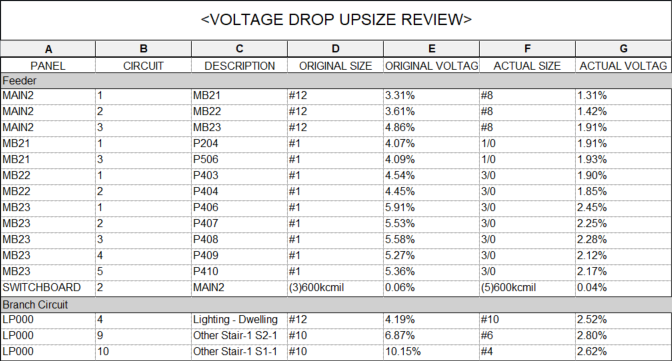
This schedule documents feeders and branch circuits that were automatically upsized due to voltage drop, allowing you to verify wire sizes and determine if changes need to be made.
The default schedule layout is shown below. Information about each circuit that has been automatically upsized due to voltage drop is listed. The circuits are grouped based upon whether the wire is a feeder or branch circuit, then ordered by the upstream device alphabetically, then by circuit number.
Once the schedule is created, you can modify it using standard Revit tools.
Voltage drop review schedule name: Sets the name of the schedule.
There are several options that affect how voltage drop is calculated and how wires are upsized. Visit the Voltage Drop Project Options section for more information.
Output shared parameter values as uppercase: Sets whether shared parameter outputs are displayed only in uppercase letters.
Text before / after parallel runs: Sets the text added before and after the number of parallel runs displayed in the Original Size and Actual Size columns.