
By default, ducts that are inserted on your drawing are centered. Any transitions between sizes are symmetrical. For most ducts, this is what you want, which is why it is the default, but there are times when you want to insert eccentric fittings.
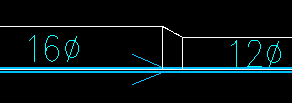
Design Master HVAC handles this using the “Horizontal Alignment” and “Vertical Alignment” settings in the ductwork. Using these settings, the duct “centerline” can become the left or right edge of the ductwork. It also can become the top or bottom of the ductwork when the “Vertical Alignment” setting is used.
This knowledge base article describes using the “Horizontal Alignment” setting to create eccentric transitions: Inserting Eccentric Transitions.
This article describes how to transition from a centered alignment to a left or right alignment in a duct: Changing Duct Offset in the Middle of a Duct Run.